R1 Neo leverages GPS & compact rugged design for Meshtastic networks
The R1 Neo is a compact, water-resistant Meshtastic device for off-grid communication and navigation. Developed by Muzi, it features an aircraft-grade aluminum base with a carbon-fiber PETG shell, offering a 16% reduction in size compared to the previous R1. The enclosure includes O-ring and compression gaskets, an IP68-rated USB-C port, and a battery capable of […] ⌘ Read more
If you could redesign Linux userland from scratch, what would you do differently?
If we kept Linux the kernel exactly as it is today, but redesigned everything in userland from scratch (the init system, the filesystem hierarchy, the shell, libc, packaging, configuration, dbus, polkit, PAM, etc.), what would you do differently, and why? ⌘ Read more
Beyond the Shell: Advanced Enumeration and Privilege Escalation for OSCP (Part 3)
Part 3 reveals the high-value Windows PrivEsc methods that defeat rabbit holes. Master file transfer, service … ⌘ Read more
TryHackMe Infinity Shell Walkthrough: Web Shell Forensics & CTF Guide ⌘ Read more
From Shell Scripts to Science Agents: How AI Agents Are Transforming Research Workflows
It’s 2 AM in a lab somewhere. A researcher has three terminals open, a half-written Jupyter notebook on one screen, an Excel sheet filled with sample IDs on another, and a half-eaten snack next to shell commands. They’re juggling scripts to run a protein folding model, parsing CSVs from the last experiment, searching for literature,… ⌘ Read more
I’ve got a prototype of my hardcopy simulator going. I’m typing on the keyboard and the “display” goes to the printer:
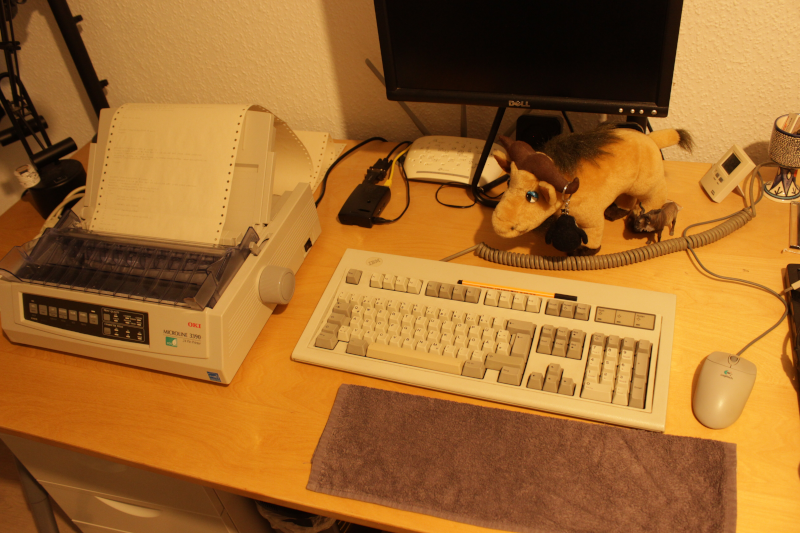
https://movq.de/v/235c1eabac/MVI_8810.MOV.mp4
The biiiiiiiiiig problem is that the print head and plastic cover make it impossible to see what’s currently being printed, because this is not a typewriter. This means: In order to see what I just entered, I have to feed the paper back and forth and back and forth … it’s not ideal.
I got that idea of moving back/forth from Drew DeVault, who – as it turned out – did something similar a few years back. (I tried hard to read as little as possible of his blog post, because figuring things out myself is more fun. But that could mean I missed a great idea here or there.)
But hey, at least this is running on my Pentium 133 on SuSE Linux 6.4, printer connected with a parallel cable. 😍
(Also, yes, you can see the printouts of earlier tests and, yes, I used ed(1) wrong at one point. 🤪 And ls insisted on using colors …)
Something happened with the frame rate of terminal emulators lately. It looks like there’s a trend to run at a high framerate now? I’m not sure exactly. This can be seen in VTE-based terminals like my xiate or XTerm on Wayland. foot and st, on the other hand, are fine.
My shell prompt and cursor look like this:
$ █
When I keep Enter pressed, I expect to see several lines like so:
$
$
$
$
$
$
$ █
With the affected terminal emulators, the lines actually show up in the following sequence. First, we have the original line:
$
█
Pressing Enter yields this as the next frame:
$
█
And then eventually this:
$
$ █
In other words, you can see the cursor jumping around very quickly, all the time.
Another example: Vim actually shows which key you just pressed in the bottom right corner. Keeping j pressed to scroll through a file means I get to see a j flashing rapidly now.
(I have no idea yet, why exactly XTerm in X11 is fine but flickering in Wayland.)
The WM_CLASS Property is used on X11 to assign rules to certain windows, e.g. “this is a GIMP window, it should appear on workspace number 16.” It consists of two fields, name and class.
Wayland (or rather, the XDG shell protocol – core Wayland knows nothing about this) only has a single field called app_id.
When you run X11 programs under Wayland, you use XWayland, which is baked into most compositors. Then you have to deal with all three fields.
Some compositors map name to app_id, others map class to app_id, and even others directly expose the original name and class.
Apparently, there is no consensus.
Just discovered how easy it is to recall my last arg in shell and my brain went 🤯 How come I’ve never learned about this before!? I wonder how many other QOL shortcuts I’m missing on 🥲
Comment on Find ASCII Emoji Easily with this GNOME Shell Applet by Nathalia Ibarra
Yazınız için teşekkürler. Bu bilgiler ışığında nice insanlar bilgilenmiş olacaktır. ⌘ Read more
Comment on Find ASCII Emoji Easily with this GNOME Shell Applet by tempemail
I appreciate you sharing this blog post. Thanks Again. Cool. ⌘ Read more
Ice-T 2.8.0 released: a VT-100 terminal emulator for the Atari 8-bit
Ice-T is a terminal emulator, allowing Atari computers with extended memory (128KB or more) to connect to remote dialup and Telnet hosts, such as Unix shells and BBSs. A limited version for machines without extended memory is also available. ↫ Ice-T 2.8.0 release announcement Version 2.8.0 was released a few days ago, the first new release in almost twelve years. It comes with a ton of improvemen … ⌘ Read more
Bypassing Windows Defender & AVs with an LNK Exploit to Gain a Reverse Shell ⌘ Read more
↳
In-reply-to
»
⤋ Read More
tar and find were written by the devil to make sysadmins even more miserable
@kat@yarn.girlonthemoon.xyz @prologic@twtxt.net Given that all these programs are super old (tar is from the late 1970ies), while trying to retain backwards-compatibilty, I’m not surprised that the UI isn’t too great. 🤔
find has quite a few pitfalls, that is very true. At work, we don’t even use it anymore in more complex scenarios but write Python scripts instead. find can be fast and efficient, but fewer and fewer people lack the knowledge to use it … The same goes for Shell scripting in general, actually.
VPS troubles and the weekend
This weekend I went to the cottage with P on Friday. I hoped I would
have a nice weekend reading in front of the wood stove, but I had also
planned to spend at least a few hours trying to configure Maddy as the
new mail server for hack.org et al.
Then the web server I moved to the new VPS died. Again. I connected to
the VNC console and, like before, the Linux kernel couldn’t find its
root disk. A simple:
# mount /dev/vda2 /sysroot; exit
in the emergency shell solved thi … ⌘ Read more
OSle: a tiny boot sector operating system
OSle is an incredibly small operating system, coming in at only 510 bytes, so it fits entirely into a boot sector. It runs in real-mode, and is written in assembly. Despite the small size, it has a shell, a read and write file system, process management, and more. It even has its own tiny SDK and some pre-built programs. The code’s available under the MIT license. ⌘ Read more
PATH isn’t real on Linux
I have no idea how much relevance this short but informative rundown of how PATH works in Linux has in the real world, but I found it incredibly interesting and enlightening. The basic gist – and I might be wrong, there’s code involved and I’m not very smart – is that Linux itself needs absolute paths to binaries, while shells and programming languages do not. In other words, the Linux kernel does not know about PATH, and any lookup you’re doing comes from either the shell or the pr … ⌘ Read more
From SOAP to Shell: Exploiting Legacy SOAP Services for Full Admin Account Takeover (And Nearly… ⌘ Read more
↳
In-reply-to
»
Can you beat me at the circle game? 😂 https://neal.fun/perfect-circle/
⤋ Read More
Can you automate the drawing with a script? On X11, you can:
#!/bin/sh

# Position the pointer at the center of the dot, then run this script.

sleep 1

start=$(xdotool getmouselocation --shell)
eval $start

r=400
steps=100
down=0

for step in $(seq $((steps + 1)) )
do
    # pi = 4 * atan(1)
    new_x=$(printf '%s + %s * c(%s / %s * 2 * (4 * a(1)))\n' $X $r $step $steps | bc -l)
    new_y=$(printf '%s + %s * s(%s / %s * 2 * (4 * a(1)))\n' $Y $r $step $steps | bc -l)

    xte "mousemove ${new_x%%.*} ${new_y%%.*}"
    if ! (( down ))
    then
        xte 'mousedown 1'
        down=1
    fi
done

xte 'mouseup 1'
xte "mousemove $X $Y"

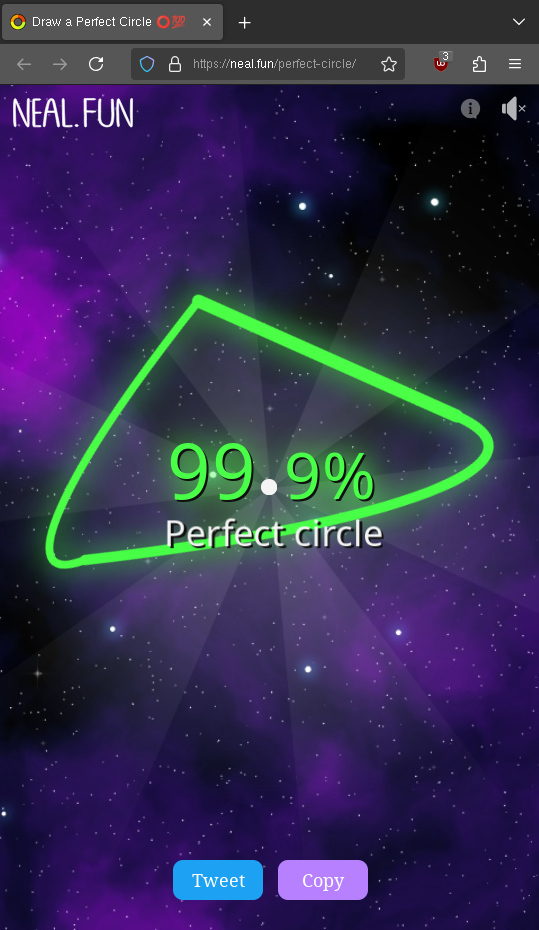
Interestingly, you can abuse the scoring system (not manually, only with a script). Since the mouse jumps to the locations along the circle, you can just use very few steps and still get a great score because every step you make is very accurate – but the result looks funny:
🥴
DietPi April 2025 Update (Version 9.12)
The April 18th update of DietPi v9.12 introduces new software options including the fish shell and Amiberry v7/Amiberry-Lite, while also expanding compatibility and resolving various issues. This release focuses on improving usability, editor flexibility, and hardware support across platforms. DietPi: DietPi is a lightweight, Debian-based operating system optimized for single-board computers and embedded systems. […] ⌘ Read more
Just keeping this shell alive, and sending an useful twtxt in the process. :-P
⚡️Oops, They Logged It! Turning LFI into Remote Shell Like a Pro ⚔️
Free Link🎈
[Continue reading on InfoSec Write-ups »](https://infosecwriteups.com/%EF%B8%8Foops-they-logged-it-turning-l … ⌘ Read more
↳
In-reply-to
»
This weekend (as some of you may now) I accidently nuke this Pod's entire data volume 🤦♂️ What a disastrous incident 🤣 I decided instead of trying to restore from a 4-month old backup (we'll get into why I hadn't been taking backups consistently later), that we'd start a fresh! 😅 Spring clean! 🧼 -- Anyway... One of the things I realised was I was missing a very critical Safety Controls in my own ways of working... I've now rectified this...
⤋ Read More
@lyse@lyse.isobeef.org I’m open to other suggestions 🤣 But hopefully both adding the additional prompt, not allowing it to enter shell history and removing from my shell history prevents me from doing such silly things in haste by pressing ^R and using fuzzy search which if you type fast you sometimes get wrong 😑
(#zzyjqvq) @lyse@lyse I’m open to other suggestions 🤣 But hopefully both adding the additional prompt, not allowing it to enter …
@lyse @lyse.isobeef.org I’m open to other suggestions 🤣 But hopefully both adding the additional prompt, not allowing it to enter shell history and removing from my shell history prevents me from doing such silly things in haste by pressing ^R and using fuzzy search which if you type fast you sometimes get wron … ⌘ Read more
↳
In-reply-to
»
This weekend (as some of you may now) I accidently nuke this Pod's entire data volume 🤦♂️ What a disastrous incident 🤣 I decided instead of trying to restore from a 4-month old backup (we'll get into why I hadn't been taking backups consistently later), that we'd start a fresh! 😅 Spring clean! 🧼 -- Anyway... One of the things I realised was I was missing a very critical Safety Controls in my own ways of working... I've now rectified this...
⤋ Read More
Then I cleaned up my shell history of all of the invocations I ever made of dkv rm ... to make sure I never ever have this so easily accessible in my shell history (^R):
$ awk '
  /^#/ { ts = $0; next }
  /^dkv rm/ { next }
  { if (ts) print ts; ts=""; print }
' ~/.bash_history > ~/.bash_history.tmp && mv ~/.bash_history.tmp ~/.bash_history && history -r
(#zzyjqvq) Then I cleaned up my shell history of all of the invocations I ever made of dkv rm ... to make sure I never ever have this so easil …
Then I cleaned up my shell history of all of the invocations I ever made of dkv rm ... to make sure I never ever have this so easily accessible in my shell history ( ^R):
”`
$ awk ‘
/^#/ { ts = $0; next }
/^dkv rm/ { next }
{ if (ts) print ts; ts=“”; print }
’ ~/.bash_history > ~/.bash_history.tmp && mv ~/.bash_history.tmp ~/.bash_history && history -r
”` ⌘ Read more
↳
In-reply-to
»
This weekend (as some of you may now) I accidently nuke this Pod's entire data volume 🤦♂️ What a disastrous incident 🤣 I decided instead of trying to restore from a 4-month old backup (we'll get into why I hadn't been taking backups consistently later), that we'd start a fresh! 😅 Spring clean! 🧼 -- Anyway... One of the things I realised was I was missing a very critical Safety Controls in my own ways of working... I've now rectified this...
⤋ Read More
So I re-write this shell alias that I used all the time alias dkv="docker rm" to be a much safer shell function:
dkv() {
  if [[ "$1" == "rm" && -n "$2" ]]; then
    read -r -p "Are you sure you want to delete volume '$2'? [Y/n] " confirm
    confirm=${confirm:-Y}
    if [[ "$confirm" =~ ^[Yy]$ ]]; then
      # Disable history
      set +o history

      # Delete the volume
      docker volume rm "$2"

      # Re-enable history
      set -o history
    else
      echo "Aborted."
    fi
  else
    docker volume "$@"
  fi
}
**(#zzyjqvq) So I re-write this shell alias that I used all the time alias dkv="docker rm" to be a much safer shell function:
dkv() {
  if  ...**
So I re-write this shell alias that I used all the time `alias dkv="docker rm"` to be a much safer shell function:
dkv() {
if [[ “$1” == “rm” && -n “$2” ]]; then
read -r -p "Are you sure you want to delete volume '$2'? [Y/n] " confirm
confirm=${confirm:-Y}
if [[ "$confirm" =~ ^[Yy]$ ]]; then
  # Disable history
  set +o history

  # Delete the volume
  dock ... ⌘ [Read more](https://twtxt.net/twt/ml3toqq)
從 Shell 到 Go:腳本編寫的優雅進化
你有沒有想過,寫腳本這件事,可能不再需要依賴 Unix Shell 了?別誤會,Shell 確實是個 “魔法工具”,能用一行命令完成許多複雜任務。但如果你是 Go 語言的愛好者,或者正在尋找一種更現代化、更高效的腳本編寫方式,那麼今天這篇文章絕對會讓你眼前一亮!我們將深入探討如何用 Go 語言結合script包,輕鬆實現原本需要 Shell 才能完成的任務。不僅代碼更優雅,還能跨平臺運行,甚至 ⌘ Read more
↳
In-reply-to
»
I’ve never liked the behavior of OpenBSD’s shell where it just scrolls horizontally:
⤋ Read More
@lyse@lyse.isobeef.org Doing the devil’s work:
https://movq.de/v/b895c14411/los86-shell-cursor-history.mp4
Better than nothing. 😅
I’ve never liked the behavior of OpenBSD’s shell where it just scrolls horizontally:
https://movq.de/v/1371f7efbc/vid-1741714971.mp4
But now I’m this close to implementing the same thing in my own shell – because it’s probably much, much easier than multiline stuff. 😅
NES86: x86 emulation on the NES
The goal of this project is to emulate an Intel 8086 processor and supporting PC hardware well enough to run the Embeddable Linux Kernel Subset (ELKS), including a shell and utilities. It should be possible to run other x86 software as long as it doesn’t require more than a simple serial terminal. ↫ NES86 GitHub page Is this useful in any meaningful sense? No. Will this change the word? No. Does it have any other purpose than just being fun and cool? Nope. None of that … ⌘ Read more
(#qn67gta) @xuu What do you like about the fish shell? 🐚
@xuu @txt.sour.is What do you like about the fish shell? 🐚 ⌘ Read more
(#qn67gta) @bender@bender I always change it to Bash. I can’t stand any other weird shell haha 😆
@bender I always change it to Bash. I can’t stand any other weird shell haha 😆 ⌘ Read more
fullmetalScience submits CCS proposal for ‘NoShore’ project
fullmetalScience1 has submitted their first CCS proposal2 looking to complete work on NoShore, a project dedicated to on-the-go offline payments:
TL;DR The document proposes a shell-based environment that users can run to enable offline payments with supporting merchants, whereas the actual signing device will be developed separately in an upcoming iteration.
”`
Total funding: 45 XMR.
ETA: Read more”`
Compact RISC-V Linux Development Device with USB Form Factor Powered by Rockchip RV1103
The Luckfox Pico WebBee RV1103 is a Linux micro development board powered by the Rockchip RV1103 chip, offering a compact platform for diverse development projects. Encased in an ABS protective shell, it supports applications such as lightweight web servers, USB script tools, and smart home devices. Similar to the Luckfox Pico Mini, this device features […] ⌘ Read more
Boyhood – Shells
While we were away for a minute, one of our favorites – Caylie Runciman aka Boyhood -- quietly dropped a short but super sweet new EP, and today she shares the beautiful, dreamlike video for title track “ Shells”… Continue reading… ⌘ Read more
(#3olv57a) @aelaraji Steal anything you want 🤣 f you manage to write a shell script version of the same tool I’d be interested in publishing …
@aelaraji @aelaraji.com Steal anything you want 🤣 f you manage to write a shell script version of the same tool I’d be interested in publishing it as an alternative tool 👌 ⌘ Read more
PEP 762: REPL-acing the default REPL
One of Python’s core strengths is its interactive mode, also known as the Read-Eval-Print Loop (REPL), or the Python console, or the Python shell. This PEP describes the new implementation of this functionality written in Python. The new REPL released in Python 3.13 aims to provide modern features expected by today’s users, such as multi-line editing, syntax highlighting, custom commands, and an overall improved interactive experience. ⌘ Read more