Of Pointlessware and CEOs
Had a moment, to check up on some of the companies, I stopped following, get to The Browser Company and see their newest product - it’s just Chrome, with an AI chat window pop-up and that’s it. Something Canary Chrome, come with already.
I see Theo from T3.gg, making fun of it on YouTube and promoting “his” product - an AI chat app, where you can choose from multiple models, by all the popular AI companies. Something I already have a worse version of, at work and I don’t even use it.
There’s also an interview, about the future of virtual keyboards, surely this is at least actually a real thing and not more pointless horse shit. I check the website of the keyboard SDK, and it’s around 20 identical apps, that just copy the same keyboard SDK/api and slap chatgpt features on top - in the App Store, these are surrounded by chatgpt clones, that just feed the users prompts, into the real thing and put ads, next to the answers.
https://omnitools.app/ Access thousands of user-friendly utilities for editing images, text, lists, and data, all directly from your browser.
been a while! i’ve been using my laptop more to kind of change my workflow, but without my browser bookmarks to remind me to check some sites, i’ve forgotten to check yarnverse! forgive me friends T_T
Run Classic MacOS & NeXTSTEP in Your Web Browser
If you’ve been a reader of OSXDaily for a while you almost certainly have seen us mention some of the fun web apps that allow you to run full fledged versions of operating systems in your web browser, from Mac OS 9, Mac OS 8, or Mac OS 7, to even Windows 1.0. Many of … Read More ⌘ Read more
Run Classic MacOS & NeXTSTEP in Your Web Browser
If you’ve been a reader of OSXDaily for a while you almost certainly have seen us mention some of the fun web apps that allow you to run full fledged versions of operating systems in your web browser, from Mac OS 9, Mac OS 8, or Mac OS 7, to even Windows 1.0. Many of … Read More ⌘ Read more
The flip phone web: browsing with the original Opera Mini
Opera Mini was first released in 2005 as a web browser for mobile phones, with the ability to load full websites by sending most of the work to an external server. It was a massive hit, but it started to fade out of relevance once smartphones entered mainstream use. Opera Mini still exists today as a web browser for iPhone and Android—it’s now just a tweaked version of the regular Opera mobile browser, and you shouldn … ⌘ Read more
↳
In-reply-to
»
@prologic Mosaic (2.7) works fine, I maintain that package in the AUR and test my website regularly. 😅
⤋ Read More
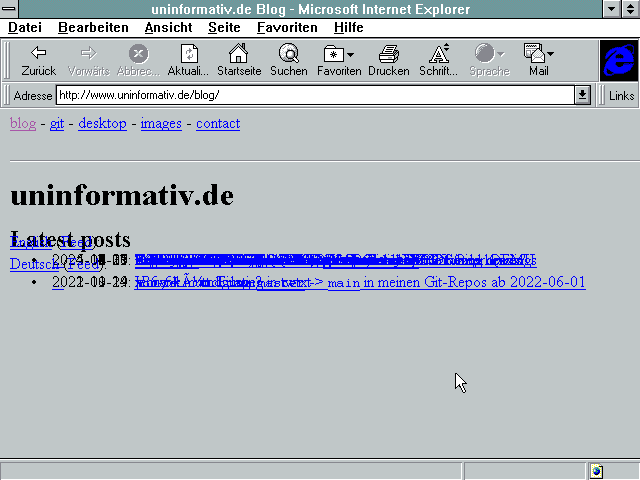
@movq@www.uninformativ.de this is mind boggling. How come it looks just fine under Mosaic, and not under IE3? Man, am I glad I don’t use a Microsoft browser!
My website is compatible with many old browsers, but Internet Explorer 3, uhm, not so much.
How to make switching between tabs browser like? ⌘ Read more
Yet Another Linux Distro Ditches Firefox for Brave
First Zorin OS, now the Fedora-based Nobara changes the default web browser. ⌘ Read more
Hacking With No Tools: How to Break Web Apps Using Just Your Browser ️♂️
Hacking With No Tools: How to Break Web Apps Using Just Your Browser 🕵️♂️
[Continue reading on In … ⌘ Read more
Is there any Markdown viewer plugin for browser, if I use vimwiki? ⌘ Read more
Also spent the morning continuing to think about a new design for EdgeGuard’s WAF. I’m basically going to build an entirely new pluggable WAF that will be designed to only consider Rate Limiting, IP/ASN-based filtering, JavaScript challenge handling, Basic behavioral analysis and Anomaly detection.
The only part of this design I’m not 100% sure about is the Javascript-based challenge handling? 🤔 I’m also considering making this into a “proof of work” requirement too, but I also don’t want to falsely block folks that a) turn Javascript™ off or b) Use a browser like links, elinks or lynx for example.
Hmmm 🧐
‘I don’t see how it doesn’t happen’: Apple eyes giant change to devices
Apple is “actively looking at” revamping the Safari web browser on its devices to focus on AI-powered search engines, a seismic shift for the industry hastened by the potential end of a longtime partnership with Google. ⌘ Read more
↳
In-reply-to
»
https://alex.party/posts/2025-05-05-the-future-of-web-development-is-ai-get-on-or-get-left-behind/
⤋ Read More
And on a similar note, cross-post from Mastodon:
What I love about HTML and HTTP is that it can degrade rather gracefully on old browsers.
My website isn’t spectacular but I don’t think it looks horrible, either. And it’s still usable just fine all the way down to WfW 3.11:
It’s not perfect, but it’s usable. And that makes me happy. Almost 30 years of compatibilty.
The biggest sacrifice is probably that I don’t enforce TLS and that HTTP 1.0 has no Host: header, so no vhosts (or rather, everything must come from the default vhost). (Yes, some old browsers send Host:, even though they predate HTTP 1.1. Netscape does, but not IBM WebExplorer, for example.)
(On the other hand, it might completely suck on modern mobile devices. Dunno, I barely use those. 🤪)
Sculpt OS 25.04 released
Sculpt OS 25.04 has been released, and with it come a number of very welcome and important improvements. What most users will care about the most is the updated version of the Falkon web browser, built atop Qt 6.2.2 and its accompanying qtwebengine release, which in turn is using version 112 of the Chromium engine. Aside from this major improvement, there’s two other things that stand out: Usability-wise, the new version comes with two highly anticipated features. First, building u … ⌘ Read more
Browser MCP - Cherry Studio 一用一個不吱聲
前提條件: 安裝 Chrome 瀏覽器,支持 Chrome 插件的瀏覽器應該也可以(沒試過)效果是:瀏覽器 Auto 能力,使用本地瀏覽器 User Data,免去需要登陸才能獲取數據的煩惱比如 查查京東Macmini的價格情況,分析價格趨勢,看看什麼時候入手最合適?本地瀏覽器登錄過京東,Auto 後是可以直接用的第一步:安裝 Browser MCP Serverhttps://chromeweb ⌘ Read more
W3C Standardizes Mozilla Developed Spying Technology
“Privacy Preserving Attribution”, first deployed in Firefox, is designed to make it easy for a browser vendor to collect large amounts data from users. ⌘ Read more
Run Mac OS X 10.2 Jaguar in a Web Browser
Mac OS X Jaguar 10.2 may have been released all the way back in 2002, but thanks to the InfiniteMac project, you can also run Mac OS X Jaguar on your modern Mac right now with just a web browser. Sure you might even have an old dusty Mac laying around in a closet that … Read More ⌘ Read more
Run Mac OS X 10.2 Jaguar in a Web Browser
Mac OS X Jaguar 10.2 may have been released all the way back in 2002, but thanks to the InfiniteMac project, you can also run Mac OS X Jaguar on your modern Mac right now with just a web browser. Sure you might even have an old dusty Mac laying around in a closet that … Read More ⌘ Read more
Another war story: the hardest bug I ever debugged
I recently stumbled on Jacob Voytko’s Google Docs bug story and it reminded me of the weirdest bug I ever chased.
It started with a user reporting their webcam was rotated by 90° — but only sometimes. This turned into a wild hunt across browsers, OS quirks, WebRTC, and even HTTP redirects.
Oddly, in defense of Google keeping Chrome
As much as I’m a fan of breaking up Google, I’m not entirely sure carving Chrome out of Google without a further plan for what happens to the browser is a great idea. I mean, Google is bad, but but things could be so, so much worse. OpenAI would be interested in buying Google’s Chrome if antitrust enforcers are successful in forcing the Alphabet unit to sell the popular web browser as part of a bid to restore competition in search, an OpenAI execu … ⌘ Read more
↳
In-reply-to
»
The tiny avatars, as expected (because they showed normal to you too @prologic), do not show under macOS’s Safari, but they do show on iOS’s Safari. It truly is a puzzle.
⤋ Read More
Hahaha! And now they show tiny! I had to reload the page. So, I see the problem on iOS and macOS Safari too. I have no other browser to test with, I exclusively use Safari.
@prologic@twtxt.net, from IRC:
- Saving preferences is failing. Specifically trying to save “Open Links” on the same window. For sure it isn’t happening. Check errors on browser’s console.
- Search results pagination is broken. Search for “twtxt.net” and see it. Also, picking oldest/newest makes no difference on that search query.
↳
In-reply-to
»
Search syntax appears to be:
⤋ Read More
Can you confirm the fix temporarily in browser before I make the CSS change? I’m rubbish at CSS 🤣
(#rk3npuq) Can you confirm the fix temporarily in browser before I make the CSS change? I’m rubbish at CSS 🤣
Can you confirm the fix temporarily in browser before I make the CSS change? I’m rubbish at CSS 🤣 ⌘ Read more
Zorin OS (Linux) Ditches Firefox for Brave
The fallout from Mozilla’s Terms of Use change continues, as a prominent Linux distribution switches web browsers. ⌘ Read more
Playing multimedia with Dillo
What if you want to use a web browser like Dillo, which lacks JavaScript support and can’t play audio or video inside the browser? Dillo doesn’t have the capability to play audio or video directly from the browser, however it can easily offload this task to other programs. This page collects some examples of how to do watch videos and listen to audio tracks or podcasts by using an external player program. In particular we will cover mpv with yt-dlp which supports YouTube … ⌘ Read more
Fixing Safari for Mac Error “This webpage was reloaded because a problem occurred”
Safari is a fantastic web browser on the Mac, but that doesn’t mean it’s always trouble-free. One issue that Safari users may see on the Mac from time to time will cause a webpage to refresh and then throw an error message that says “this webpage was reloaded because a problem occurred”. You might also … [Read More](https://osxdaily.com/2025/03/19/fixing-safar … ⌘ Read more
Leveraging Docker with TensorFlow Models & TensorFlow.js for a Snake AI Game
Learn how TensorFlow.js can be used with Docker to run AI/ML in a web browser, using a real-world example of a Snake AI game. ⌘ Read more
PEP 776: Emscripten Support
Emscripten is a complete open source compiler toolchain. It compiles C/C++ code into WebAssembly/JavaScript executables, for use in JavaScript runtimes, including browsers and Node.js. The Rust language also maintains an Emscripten target. ⌘ Read more
A look at Firefox forks
Mozilla’s actions have been rubbing many Firefox fans the wrong way as of late, and inspiring them to look for alternatives. There are many choices for users who are looking for a browser that isn’t part of the Chrome monoculture but is full-featured and suitable for day-to-day use. For those who are willing to stay in the Firefox “family” there are a number of good options that have taken vastly different approaches. This includes GNU IceCat, Floorp, LibreWolf, and Zen. ↫ Joe Brockm … ⌘ Read more
Haiku gets new malloc implementation, removes Gopher support from its browser
We’ve got the Haiku activity report covering February, and aside from the usual slew of bug fixes and minor improvements, there’s one massive improvement that deserves attention. waddlesplash continued his ongoing memory management improvements, fixes, and cleanups, implementing more cases of resizing (expanding/shrinking) memory areas when there’s a virtual memory reservation a … ⌘ Read more
Genode OS Framework 25.02 released
The prime feature is the continuation of the multi-monitor topic of the previous release, covering multi-monitor window management and going as far as seamlessly integrating multi-monitor virtual machines (Section Multi-monitor window management and virtual machines). The second and long anticipated feature is the Chromium engine version 112 in combination with Qt 6.6.2, which brings our port of the Falkon web browser on par with the modern web (Section Qt, WebE … ⌘ Read more
Welcome to Ladybird, a truly independent web browser
Article URL: https://github.com/LadybirdBrowser/ladybird
Comments URL: https://news.ycombinator.com/item?id=43200604
Points: 506
# Comments: 184 ⌘ Read more
spirobel submits CCS proposal to develop Monero Payment Links, Browser Wallet, multisig companion app
spirobel1 has submitted a CCS proposal2 to finish developing the Monero Browser Wallet3, create a self-hostable Stripe Payment Links 4 alternative5 and a multisig companion app, in an effort to make XMR web shopping more convenient and secure:
Currently Monero shoppers have to copy and paste addresses from the t … ⌘ Read more
** mkv no more **
My previous post included a video. I made that video with OBS which outputs .mkv video files.
I wanted to do my best to ensure that folks with a variety of devices and browsers would be able to watch the video if they wanted to, so, I converted it into a few different formats.
Here’s the bash script I wrote to do that. It relies on ffmpeg.
”`hljs bash
#!/bin/bash
if ! command -v ffmpeg &> /dev/null; then
echo "ffmpeg ... ⌘ [Read more](https://eli.li/mkv-no-more)```
(Updated) NanoKVM-USB: 4K HDMI Loopback, USB 3.0, and Integrated Keyboard/Mouse Control
This month, Sipeed unveiled the NanoKVM-USB, described as a compact and low-cost device designed to simplify the operation and management of multiple systems. The Sipeed Wiki pages indicate that this device eliminates the need for dedicated keyboards, mice, or monitors. It allows users to perform operations graphically through the Chrome browser on a single computer, […] ⌘ Read more
Three years of ephemeral NixOS: my experience resetting root on every boot
We had a bit of a bug caused by changes we made to make quotes look better, but we’ve fixed it now, so we’re back on track (you may need to do a force-reload in your browser). Sorry for the disruption – and if you want to stay up-to-date on such issues next time it (inevitably) happens, you should follow the OSNews Fedi account (or just bookmark it without following it, if you’re not … ⌘ Read more